Friday, January 07, 2011

iPhone, iPod Touch, iPad Guide (Part 3)

Essential Apps

These are the apps I use every single day, multiple times a day. I use them on an iPhone, but most of them also work on the iPod touch and iPad as well. I will note any issues with the various devices as needed.

Facebook (free)

The iPhone Facebook app is easier to use than accessing Facebook directly through the web browser. You are better off using the browser if you have an iPad.

MobileRSS Pro – Google RSS News Reader ($2.99)

I use Google Reader as my RSS reader so I don’t have to mark articles as read over and over again—anything that can access the Google RSS feed gets synchronized. This has been the best overall reader I have found, but it’s still not perfect.

WSBTV.com (free)

This is only good if you live in Atlanta. It essentially covers everything the TV news show covers, so if you don’t like their reporting then you won’t like the app. It also has the same exact weather images, so you will be consistently informed.

USA Today (free)

This is a fantastic iPad app (the iPhone one isn’t that great). Not only does it present the news in an easy-to-browse interface, but it has a fantastic free Crossword feature!

App Miner (free)

This application is a great way to keep an eye on the latest apps. I use it daily to look for app bargains. Most of my apps were purchased at a discount thanks to this app. Many apps over $4 go on sale for half price and many $1 apps become free for a limited time. You can make it track apps for you if you have your eye on a $5 app but just don’t want to spend the money.

PriceCheck by Amazon (free)

This has turned into a very useful app. You can scan a bar code with it to find out how much it costs at Amazon and other websites. You can also search by typing in or by just taking a picture of the product (books and packages mainly).

Grocery IQ (free)

This is by far the best shopping list program I have found. You can scan items as you throw them away to add them to your shopping list. It has a great search engine if you need to type it in. The best part is that it syncs the list online with its servers so you can share a grocery list with your spouse and their iDevice! It even lets you know when they add items to the list so you know to check it when you go to the store on the way home.

Zinio (free, $ downloadable content)

This is just a magazine reader. However, it supports the Retina display and has many of the magazines I read. Many of the magazines are very cheap, so it’s easy to justify the cost. For example, Automobile magazine is $7.50 for 12 months. It’s great to be able to carry around full-color, current magazines. It even lets you know when a new issue is available.

iPhone, iPod Touch, iPad Guide (Part 2)

Terminology

Retina Display – This is the display on the iPhone 4 and the latest iPod Touch. It has four times the resolution of the previous generation of devices, which were already fantastic. They use this term because its pixels are apparently smaller than what your retina can distinguish at a normal distance.

Push Notifications – This is basically a way for companies to send you messages for specific apps whenever something changes. For example, Zinio will alert you when a new issue is available. Smurf Village will let you know when your strawberries are ready. These notifications work even if the programs aren’t running.

In-App Purchases – Many programs are now free because they rely on in-app purchases to make money. For example, Smurf Village is free but Smurfberries cost real-word cash to purchase. If you ever do something that will charge your iTunes account then you will be prompted by the device to re-enter your iTunes account password. This is good for 15 minutes, so you don’t have to type it in if you purchase anything else during that period. If this is a concern then you should unlink your credit card from your iTunes account, purchase iTunes gift cards and associate those with your account. There have been extraordinary stories about kids racking up $600 in Smurfberry charges. Apple isn’t great about refunding money for these situations.

Universal App – This is a bit confusing. Pretty much every iPhone app will run on an iPad so compatibility isn’t really an issue. However, the older iPhones, the iPhone 4 and the iPad all have different screen resolutions. Whenever you run an iPhone app on the iPad it will run in a small window in the middle of the screen. You can click the ‘2X’ icon on the screen to make the app zoom to take up most of the screen. However, it will be ‘pixelated’ because of how it scales the image, so the app won’t look that good. iPad-specific apps will not run on an iPhone at all. A universal app runs on all devices AND uses the entire screen on an iPad. This really doesn’t matter for something like solitaire, where graphics are not important, but it’s significant if the app displays a lot of text. Some apps have separate versions for the iPhone and iPad, which means you have to pay twice if you want it to look great on both platforms.

Multi-Tasking – The devices don’t support full multitasking. Instead they let programs stay loaded in memory so they appear instantly when you go back to them. Some background processes are allowed, so you can run Pandora while surfing the Internet.

iPhone, iPod Touch, iPad Guide (Part 1)

Apps

Apps are why iOS devices are so popular. Use the App Store app on your device to download them.

Apps are tied to a specific iTunes account, so if you own an iPhone and an iPad then you only have to pay for an application once to use it on both devices. We currently have all of our iDevices set up on the same iTunes account so that we can share between all devices. For example, if I buy Angry Birds for my iPhone then it’s assocated with my account. Sonya uses the same account on the iPad so when she downloads it she won’t have to pay (it will look like she will have to pay, but then it will state that you already own the app so you can download it again for free). This can add up to a significant savings if you have multiple people in your household with multiple iDevices.

When you sync your device with your computer then it keeps the information on each device separate, so you don’t have to worry about anything weird happening just because you are sharing an account. You can even have multiple computers associated with a given account, so you can sync with your laptop and your kid can sync with another computer. iTunes has a limit of 5 computers per account, so you can’t do this for everyone you know.

Internet Connectivity

I mainly use my iPhone as an Internet appliance. I check e-mail, surf the web, read news, check Facebook, etc. For me having Internet connectivity is essential to the experience of owning an iDevice.

You can connect an iPhone or 3G iPad to the Internet using the built-in cell phone data plan. There are no more unlimited data plans, but 2GB for $25 isn’t bad, and each additional GB is only $10.

Another option is to use Wi-Fi. If you don’t have a wireless router in your house, but you do have a broadband connection (Cable Modem or DSL) then you should invest in one. You can get one for less than $50, which will pay for itself after the first two months of use if you are considering a 2GB data plan for a 3G iPad. Most ‘sit-down’ places now have free Wi-Fi, like Starbucks, McDonalds, Chick-Fil-A, etc. Most hotels also have free Wi-Fi as well, but you need to check before you plan your vacation around watching Netflix on your iPad in the room!

A third option is a ‘hotspot’. These are portable 3G or 4G devices that look like a Wi-Fi access point to your iDevice. This may be a good option if you use Verizon or if you want to have the access available for other devices as well, like laptops. These require a monthly fee and many also require a contract, but if your house has fantastic reception then you could consider using it instead of a Cable Modem or DSL.

Other Considerations

Apple is working really hard to make its devices work seamlessly together. The current version of Apple TV is an AirPlay receiver, meaning you can redirect some audio and video sources to it. For example, if you are watching a video on your iPhone using the YouTube app and you want to share it with everyone, you can tell your iPhone to display the video on your AppleTV. In addition, you can use the Remote app to control your AppleTV like a touchpad—it even displays a keyboard when you need to enter text so you don’t have to use arrow keys to enter in a search keyword.

The AppleTV device is also an iOS device, meaning it uses the same basic operating system as the iPhone, iPad and iPod Touch. This opens the possibility that it will support some sort of downloadable app feature. Even without that, it’s worth it to me as a dedicated NetFlix appliance. I go into more detail about NetFlix later.

Thursday, May 27, 2010

VS2010 Will Create iPhone Apps?

Apple: Will Steve Ballmer Show Up At The WWDC Keynote? - Tech Trader Daily - Barrons.com

Apparently he will be there to talk about VS2010 and that it can be used to create iPad, iPod & iPhone appps.

Friday, April 30, 2010

Jobs: Thoughts on Flash

I'm really surprised Steve Jobs wrote this and put it out there for all to see.

Essential thoughts:
1) Flash is not an open format
2) Flash is not necessary for the "full web" experience
3) Reliability/Security/Performance issues
4) Hardware (H.264) vs. software (Flash) video decoding and battery life
5) MouseOver events
6) Adobe wants to use Flash to create native iPhone/iPad/iPod touch apps

Thoughts on Flash

Thursday, April 29, 2010

Volkswagen bik.e - Electric portable bike


The Volkswagen bik.e folds up into the size of a spare tire, goes for about 20 miles on a charge, and can be charged by being plugged in to the car.

Volkswagen bik.e replaces spare tire with electric mobility device [w/video] — Autoblog Green

Boy Scout Video Game Beltloop


You can now earn a belt loop by playing video games! Well, it's a little more involved, but still...
Video Games

Wednesday, April 28, 2010

Is Bowersox Out?


Poor Bowersox. This is the first time all four judges said she didn't do a fantastic job. It was still fantastic, according to them, just not her best performance. They told everyone else that it was their best performance ever (mostly anyway). I wonder if that's all it will take for her to get voted off.

Hate the iPad?


This is, like, the opposite of an iPad. A keyboard with a tiny screen. I really like ASUS but I just can't imagine this succeeding.

ASUS EeeKeyboard

iRetrofone Base


One of my friends spent a fair amount of time and money to get an authentic 1970s rotary dial phone. Maybe he'll get this when he gets an iPhone.
iRetrofone Base

Wednesday, March 17, 2010

Treadmill bike?


I think this is actually a real working prototype, not a spoof.
Treadmill Bike Concept

Abed Nadir = Scotty Pelk

=

The character Abed Nadir from the TV show Community is almost the same character as Scotty Pelk from the movie Film Geek. They both have encyclopedic knowledge about film, but Abed is well liked while Scotty turns everybody off. I kept thinking "That's something Abed would do" the entire time I watched the film.

Abed's quirkiness isn't considered a problem because it's productive. He improves the lives of his friends through his insights and makes lots of student film shorts. Scotty forces his opinions about directors, widescreen vs. pan-and-scan, etc., on customers at his video store to the point that they complain to the manager. Abed goes on dates and actually talks about different subjects, while Scotty can only talk about how awesome a given director is, then mentions his essay "[director] Is Awesome! By Scotty Pelk" on his website.

I don't know how Abed ends up, but Scotty's life takes a turn by the end of the movie. I can't say any more without spoiling it, but if you wonder how Abed would fare in real life, watch this movie.


I can't believe no one else has made this connection (based on Internet searches, anyway).

Friday, March 12, 2010

Spy Coin Holds MicroSD Card


(picture via makersmarket.com)

It's almost $30 but still pretty neat. You can put a MicroSD in it so you can accidentally give someone pictures of your family when you give them change.

Makers Market: MicroNickel Hollow Spy Coin

iPad Preorder


(image via Apple)

I love the idea of this thing, but without a videoconferencing camera on the front and without Flash support I just can't justify it. Everything else about this Big Ol' iPod Touch makes me want to buy it.

iPad - Apple Store (U.S.)

Thursday, March 11, 2010

Google Maps Now Has Bike Routes

Google Maps is starting to add bike routing. You can find bike trails, bike-friendly roads, etc. It will route you around busy intersections and will avoid going uphill when possible.

Go to http://maps.google.com/biking to see what bike trails are in your area.

Official Google Blog: Biking directions added to Google Maps

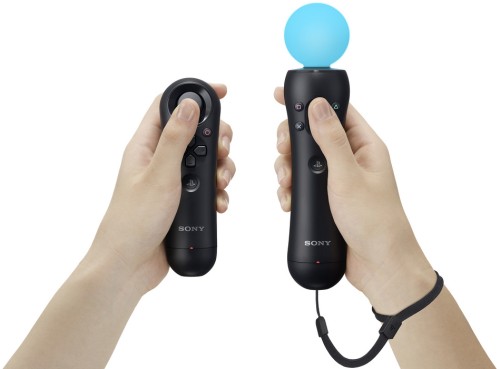
PlayStation Wiimote

Playstation Move has been officially announced. First glance makes it look a lot like a Wiimote + nunchuck.


Image via TechSpot.com

It is lighter, has built-in rechargeable batteries, is completely wireless, has a different button layout, etc. The ball is the only real innovation--the Sony camera determines what color is missing from the background then changes the ball to that color so that it can be easily tracked. Of course, it's not very accurate right now but I'm sure they'll have that ironed out by the time it's released.

In my opinion, the Wiimote combination is quite silly, but is appropriate for the silly Wii. The Wii tries very hard to be a simple fun family gaming system. FPS games are certainly easier to play on the XBox 360 than the Wii. I can't imagine how this limited-button controller could be used for existing games, so users will essentially have to buy an entirely new set of controllers & games to use this, so what is its advantage over just buying a Wii? I can see Nintendo cutting the price again this year to get even more market share.

I am glad we finally bought a 360, but that's because it's cheaper than buying a new PC for its graphics card. I pretty much only play PC games on it, while I play everything else on the Wii. I guess if I only had a PS3 this would be a more exciting announcement.


PlayStation Move first hands-on (update: video!) -- Engadget

Tuesday, March 09, 2010

Obama Caught Lip-Syncing Speech

What a losser. He needs to be impeched. This is whats wrong with America. I'm glad he got caught doing something shameful. I was just thinking about what else he could do stupid and wala! He does this! The Democrats and there followers must feel really stupid now! Go to school!

Obama Caught Lip-Syncing Speech

Gotta love the Onion.

Monday, March 08, 2010

Perspective

One of my old friends from high school just lost her husband to a complication after surgery. He went in for his septum and was at home on medication when he passed away in his sleep. Reminds me that petty things are petty things.

Friday, March 05, 2010

MacDailyNews - Why Adobe's Flash doesn't work on Apple's iPad, iPhone, and iPod touch

Duh. There is no 'mouseover' event on touchscreens, so most Flash applications won't work, so they just don't support it at all. I found it hard to believe that the iPhone wasn't powerful enough to show the Flash-based menus on our son's school's website.

MacDailyNews - Why Adobe's Flash doesn't work on Apple's iPad, iPhone, and iPod touch

Thursday, March 04, 2010

How cybercriminals invade social networks, companies - USATODAY.com

I'm surprised at how extremely specific this is about how they did it. The only thing they didn't explain was how the guy's Facebook account was hacked.

How cybercriminals invade social networks, companies - USATODAY.com